
At Zip we have a selection of Controls that help manage and secure users identities. Below provides an overview of each control, with relevant information of how to action ensuring your organization is compliant, and getting value from each control.
Two-Factor Authentication Control
What Is it & Why it is Important?
Enable two-factor authentication for accounts. Two-factor authentication (2FA) adds an extra layer of security to the login process by requiring two forms of verification to access an account or system. In the case a password is compromised, two-factor authentication provides an additional of protection.
Turning it On
2FA is not an auto-enabled control, as we require users to set up their method of 2FA. In order to push it out to users who don’t already have it enabled, you can follow the instructions below:
- Navigate to Two-factor Authentication control
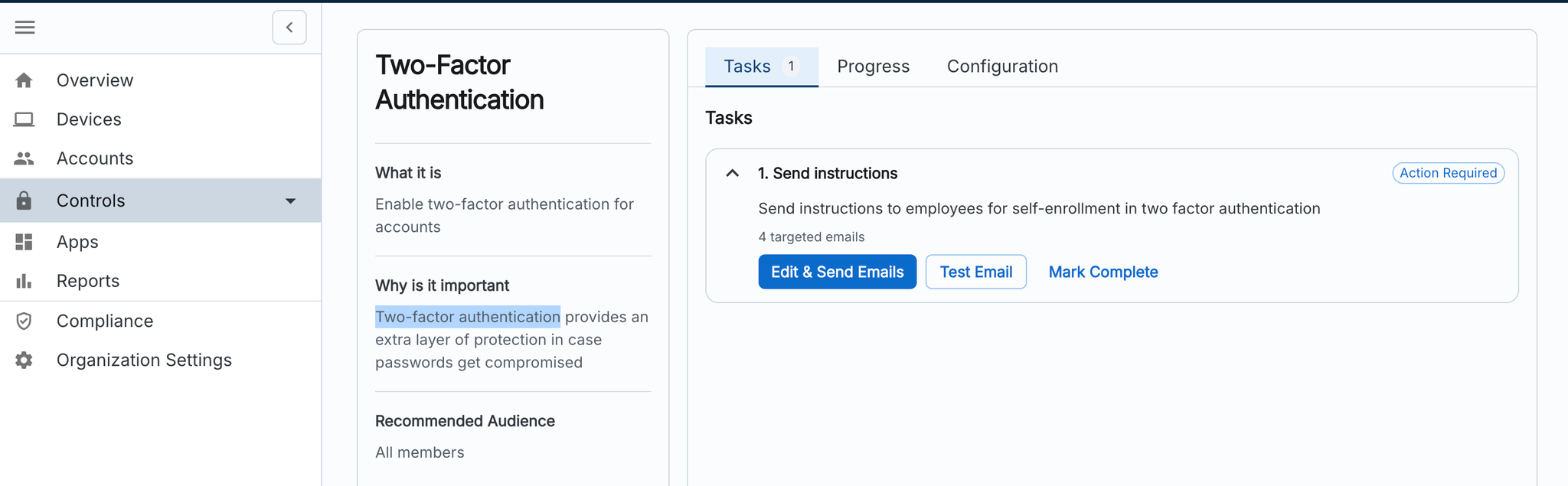
- “Click Edit & Send Emails”
- Check the recipient list to confirm who it is being sent to
- Hit Send
Should your employees need further instructions on how to enable MFA, feel free to link them to the relevant section of these instructions:
Enabling MFA